Shall we discuss your project?
MODX Integration
Your MODX form, wired straight into Housecall Pro
Every contact form submission becomes a customer record and a lead inside Housecall Pro, in seconds, with the source attached and the spam already filtered out. No retyping, no shared inbox, no lead that quietly disappears.
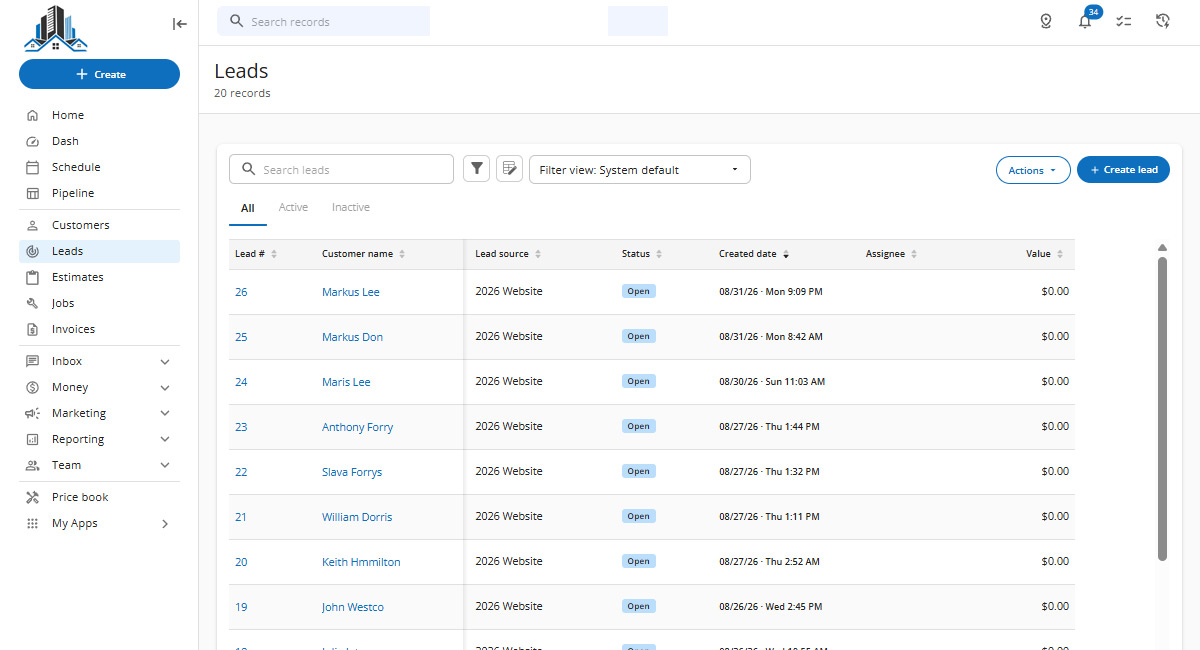
Send Form: Visitor send feedback form.
MODX contact form: FormIt + AjaxForm, your markup
Spam control: Honeypot, page token, keyword filter
HCPLead snippet: Search → verify → create
POST /customers + leads: Official Housecall Pro API
Job Inbox → API Leads: Attributed, owned, convertible
First, the platform
What Housecall Pro does, and the one gap it leaves
Housecall Pro is field service management software used by plumbers, HVAC companies, electricians, gate and access control contractors, cleaners and landscapers across the US. One account holds the customer list, estimates, scheduled jobs, dispatch, invoices and payments. Three parts of it matter here.
Job Inbox
Where incoming leads collect. It has channels for Housecall Pro's own tools, for partners like Angi, Thumbtack and Yelp, and a dedicated API Leads channel for leads pushed in by custom integrations.
Pipeline
The board where leads sit with a status: Active, Won or Lost. Marking one Won offers to copy it straight into an Estimate or a Job, so a website inquiry becomes scheduled work in a click.
Lead sources
The account's list of where work comes from. Housecall Pro reports on this field, which is how you find out which marketing produced booked jobs instead of counting form fills.
Your website is the one lead channel Housecall Pro does not connect to by itself, unless you use its own embedded form. That is the gap this service fills.

What a form-to-email workflow really costs
A missed lead never announces itself. Nothing turns red. The job goes to whoever answered first, and your close rate slips a little with no obvious reason.
The lead sits
Form emails land next to vendor invoices and spam. An inquiry answered in five minutes converts at a completely different rate than one answered tomorrow. Email has no clock on it.
Nobody owns it
No status, no assignment, no record of who called. Two people reach the same homeowner, or nobody does. Answering "did we follow up?" means searching a mailbox.
Attribution disappears
The lead came from a paid click on a specific landing page. Typed in by hand it becomes a customer with no source, and your ad reporting turns into guesswork.
Your list degrades
One person types (650) 555-0134, another 6505550134. Duplicate records pile up until nobody can tell which profile holds the service history.
Under the hood
A snippet in your hook chain, not a plugin you rent
The integration is a custom MODX snippet running as a FormIt hook. It is installed in your site, it belongs to you, and it has no monthly fee attached to it.
FormIt processes a submission through a chain of hooks in order. Ours sits at the end of that chain, behind your validation, spam checks, local save, UTM capture, notifications and email.

Two API calls, in the documented order
POST /customers creates the customer when one is needed. POST /leads creates the lead attached to that customer ID. Housecall Pro describes lead creation as requiring an already existing customer, so the sequence is not optional.

Deduplication, because the API will not do it
Housecall Pro documents that customer creation is not idempotent. Every call creates another customer, there is no idempotency key, and no endpoint deletes one afterward. We search first, re-verify against a normalized email or phone rather than trusting fuzzy search, and create only on a real miss.

Normalization on every field
Phone numbers are converted to E.164 before they are sent. Emails lowercased and trimmed, names whitespace-collapsed. That satisfies the API and makes matching reliable at the same time.

Failure handling that stays quiet only when it should
Bounded retries that never blindly repeat a create, Retry-After honored on a 429, full request and response logging with credentials scrubbed out, and an alert to your team when a call fails.

The API key never touches the browser
It lives in server-side configuration, outside the web root where possible, excluded from version control. A Housecall Pro key grants access to the entire account, so it is treated as a credential and not as a setting.
Before you ask for a quote
What your account needs first
Housecall Pro side
- A MAX plan. The Public API, Webhooks and the API Leads channel are all MAX features. On Basic or Essentials no developer can work around it.
- An API key with Full access, generated by an Admin under My Apps → All Apps → API Key Management, sent through a secure channel.
- The API Leads channel enabled in the Job Inbox app.
- A lead source created in Settings → Lead Sources. The field is validated against that list, so the value has to exist first.
- A decision on Job Inbox auto-reply. It is on by default and messages the lead on your behalf.
Website side
- Server-side access to the MODX install, or a working relationship with whoever has it.
- Your existing form, whatever it is built on. FormIt and AjaxForm are home ground for us.
- Somewhere to write log files.
- Data duplication and forwarding. You can simultaneously send lead data to other channels. For example: Telegram.
- Not on MODX? The same pattern works on WordPress, custom PHP, Node, or any stack that can make a server-side HTTPS request.
Outcome
What changes the day it goes live

No lost leads
Every qualified submission is an object in your CRM with a status, an owner and a timestamp, not an email somebody may or may not have read.

Faster first response
The lead is in Job Inbox before the visitor closes the tab, and your team can reply to the customer from inside Housecall Pro.

Visible interaction history
You can see whether anyone has touched a lead and what its current status is, without asking around the office.

Real marketing attribution
The source travels with the lead into the estimate and the invoice, so you can report on which channel produced booked work.

One clean customer list
Repeat customers stay one record with one service history, because matching happens before anything is created.

No new subscription
The logic runs inside your own site. No connector service in the middle, no task quota, no third party holding your customer data in transit.
Scope
What the project includes
With the account prerequisites in place, a standard form-to-lead integration takes a few days including live testing.
Discovery
We review your form, hook chain, spam controls and Housecall Pro setup. You get a field map showing exactly what lands where in the CRM.
Build
The snippet installed and running: field mapping, lookup and deduplication, customer and lead creation, attribution, retries, logs, failure alerts, parallel delivery.
Testing
Live submissions against your real account, since Housecall Pro publishes no sandbox. Test records are marked clearly and cleaned up before go-live.
Handover
Documentation of what was installed, which key it uses, what each config value does, and how to read the log when something looks wrong.
Questions
Before you commit
The things every owner asks us in the first call, answered here so you do not have to book one to find out.
Not if it is built properly. The API itself will happily create duplicates, since customer creation is explicitly not idempotent and there is no idempotency key. Deduplication happens in our code: search first, verify the match exactly, create only on a genuine miss.
The lead is saved locally and sent through your email and messaging channels before the API call is attempted. The failure is logged with the exact response, your team is alerted, and the lead is entered by hand. You lose a few minutes, not a customer.
No. That is the point of using the API rather than an embed. Your form keeps its markup, styling, fields and behavior, and the integration attaches behind it.
Only if every campaign name is pre-created in Settings → Lead Sources, because the field is validated against that list. We normally keep a small stable set of channel sources and put campaign detail in the lead notes, which is easier to maintain and just as reportable.
Only if every campaign name is pre-created in Settings → Lead Sources, because the field is validated against that list. We normally keep a small stable set of channel sources and put campaign detail in the lead notes, which is easier to maintain and just as reportable.
As safe as your server. It never appears in front-end code or page source, it lives in server-side configuration, it is excluded from version control, and it is scrubbed out of logs. A Housecall Pro key grants access to the whole account, so it is handled as a credential.
The API supports it, and both require an existing customer and address. We recommend against it for website inquiries. A form fill is a lead, not a scheduled job. Let your office qualify it and convert it inside Housecall Pro, which is one click from the API Leads channel.
A few days once the prerequisites are in place. Delays almost always come from the plan tier, the API key, or an undecided lead source name.

If you like what you see, let's work together.
I bring rapid solutions to make the life of my clients easier. Have any questions? Reach out to me from this contact form and I will get back to you shortly.